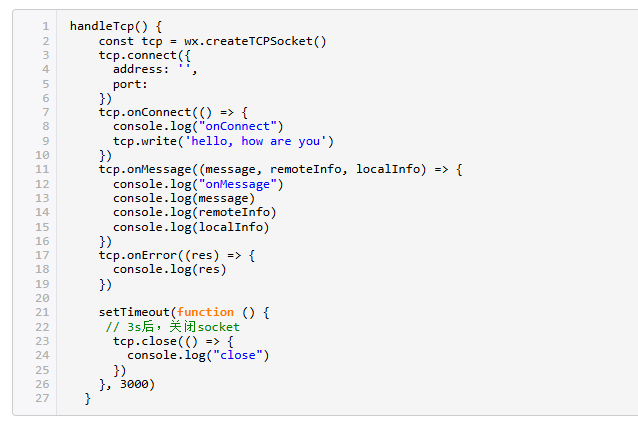
百度编辑器(ueditor)功能丰富,在移动端的适配也做的不错,而且自带了代码块的编辑和高亮显示功能。打开代码块的编辑和显示功能,有下面3个步骤:
注意菜单项的配置是否包括了插入代码的菜单项;
菜单名称:insertcode ,菜单项的默认配置文件是 ueditor.config.js
toolbars = [[
    'source','insertcode',
    'bold', 'italic', 'underline', 'strikethrough', 'customstyle', '|', 'forecolor', 'backcolor', 'insertorderedlist', 'insertunorderedlist', '|',
    'lineheight', '|','fontfamily', 'fontsize', '|',
    'justifyleft', 'justifycenter', 'justifyright', 'justifyjustify','indent' ,'removeformat', '|',
    'link',
    'insertimage',  'insertvideo', 'attachment', '|', 'inserttable', 'deletetable', 'insertparagraphbeforetable', 'insertrow', 'deleterow', 'insertcol', 'deletecol', 'mergecells',
    'spechars']];
配置好菜单后,编辑器工具菜单栏里会显示【代码语言 】项的菜单
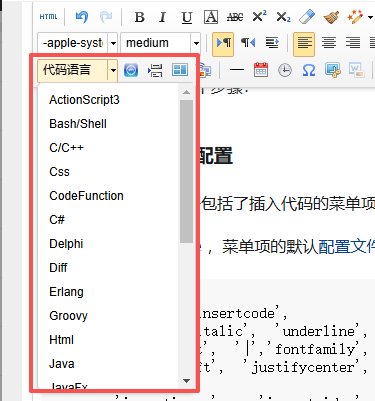
编辑代码块内容

前端显示内容时,需要引入SyntaxHighlighter插件,并调用初始化方法后才会进行渲染
<script type="text/javascript" src="/lib/ueditor1_4_3_2/third-party/SyntaxHighlighter/shCore.js"></script>
<link rel="stylesheet" type="text/css" href="/lib/ueditor1_4_3_2/third-party/SyntaxHighlighter/shCoreDefault.css"/>
<script type="text/javascript">
    $(document).ready(function () {
        SyntaxHighlighter.all();
    });
</script>
渲染效果